Practice management software for expert witnesses
built around how you actually work.
Manage your cases, clients, calendar, documents, deadlines, time, billing, and disclosures — all in one place.
No credit card required.
Tuesday, September 8
Retaining: Johnson & Associates
Active Cases
4
This Month
$12,450
Unbilled
$3,225
Documents
17
Cases, calendar, billing — one practice. ExpertPractice
Your expertise belongs in the courtroom.
Not in spreadsheets.
Organize cases, track billable time, create invoices, and stay prepared — all in one place.
Your entire expert witness practice, connected.
Everything stays connected to the case it belongs to.
Real Experts. Real Experiences.
See what professionals are saying about managing their practice with ExpertPractice.
“It’s intuitive to use, and from the moment I created an account it provided exactly the tracking I needed. There are fully customizable features that have come in handy over time but, to start, I just wanted a simple and effective tool without too much fuss to set up. Best part is the responsive customer service/assistance I can get with a simple email: no chatbot trying to direct me to an article that doesn’t answer my question; a real person who can actually help. This review sounds like a paid testimony but it’s not, I actually just think this is a very well-made platform. Glad I found it.”
“Great program that is streamlined and keeps your documents secure all in one place.”
“ExpertPractice has significantly reduced the time I spend on billing and invoicing while making my invoices look much more professional. The software team has been incredibly responsive to my suggestions, turning feedback into improvements that have made the software even better.”
Our customers work in sensitive legal matters. We respect their privacy, which is why some testimonials are shared without names. Every review comes from a real ExpertPractice user.
Already tracking time in Excel?
1. Upload
Upload your spreadsheet. We show you exactly how we read every column.
2. Confirm
You confirm every mapping. We never silently assume.
3. Use EP
Use ExpertPractice for a week alongside your current system.
4. Compare
Export in YOUR format. Open both side-by-side. Numbers match? We're accurate.
Your data stays yours. Export anytime, in your format. No switching required.
The problem
Your practice shouldn't live across six different tools.
- Cases and contacts in a spreadsheet, depositions on a separate calendar.
- Documents buried in folders, Rule 26 testimony history assembled by hand.
- Time tracked in a standalone timer, invoices built in Excel or QuickBooks.
The solution
One system for your entire expert witness practice.
- Cases, clients, calendar, documents, time, and invoices — all connected, not juggled across tools.
- Rule 26 disclosures and challenge history auto-populate from your case data.
- Invoices generate straight from your logged time — no re-typing, no math errors.
See it in action
A clean, focused interface built for how you actually work.
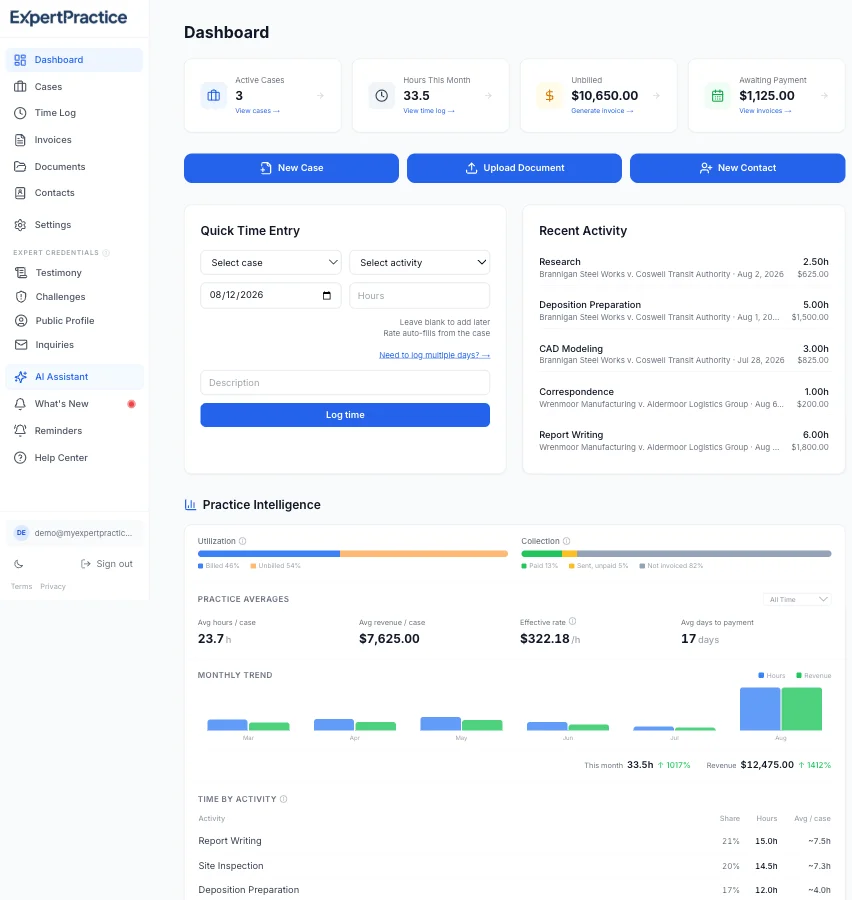
Practice overview
Active cases, hours logged, unbilled amounts, and payments awaiting collection — all at a glance, with quick-add time entry right on the dashboard.
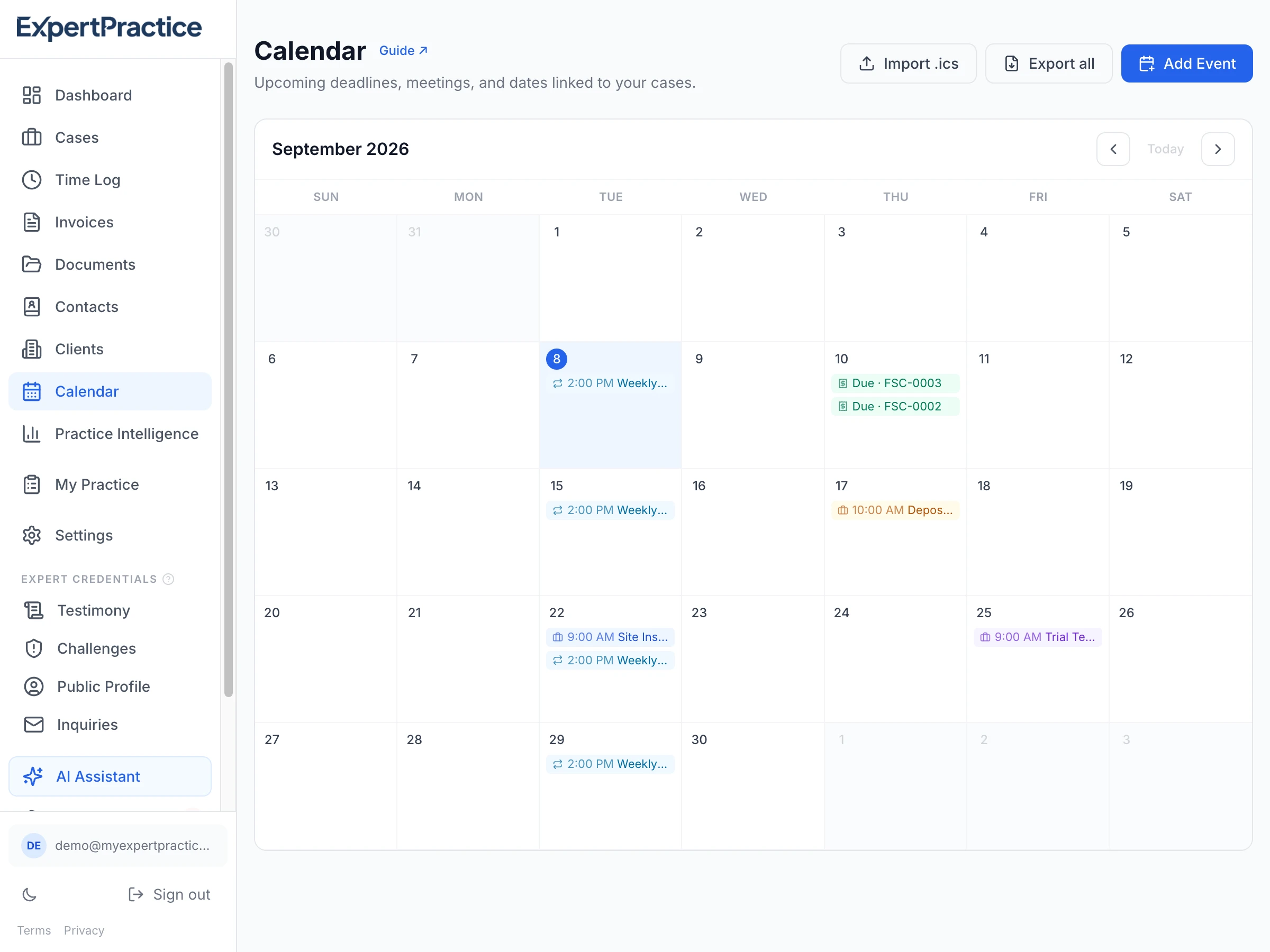
A real calendar, not a list
Depositions, court dates, and meetings linked right to a case, with recurring events and invoice due/overdue markers appearing on the grid automatically.
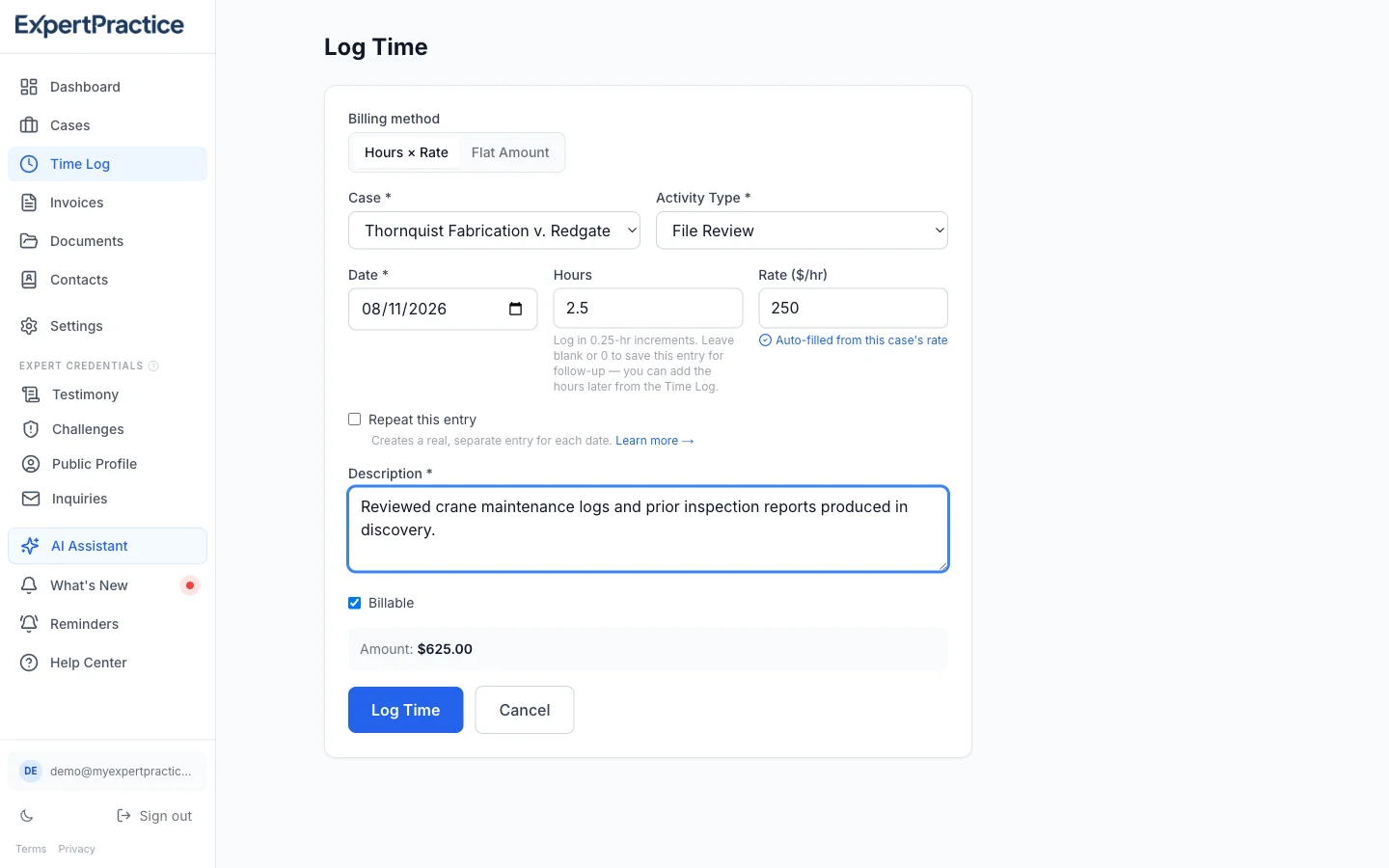
Multi-rate time tracking
Select a case and activity type — file review, deposition, trial testimony — and the rate auto-fills from that case's rate structure.
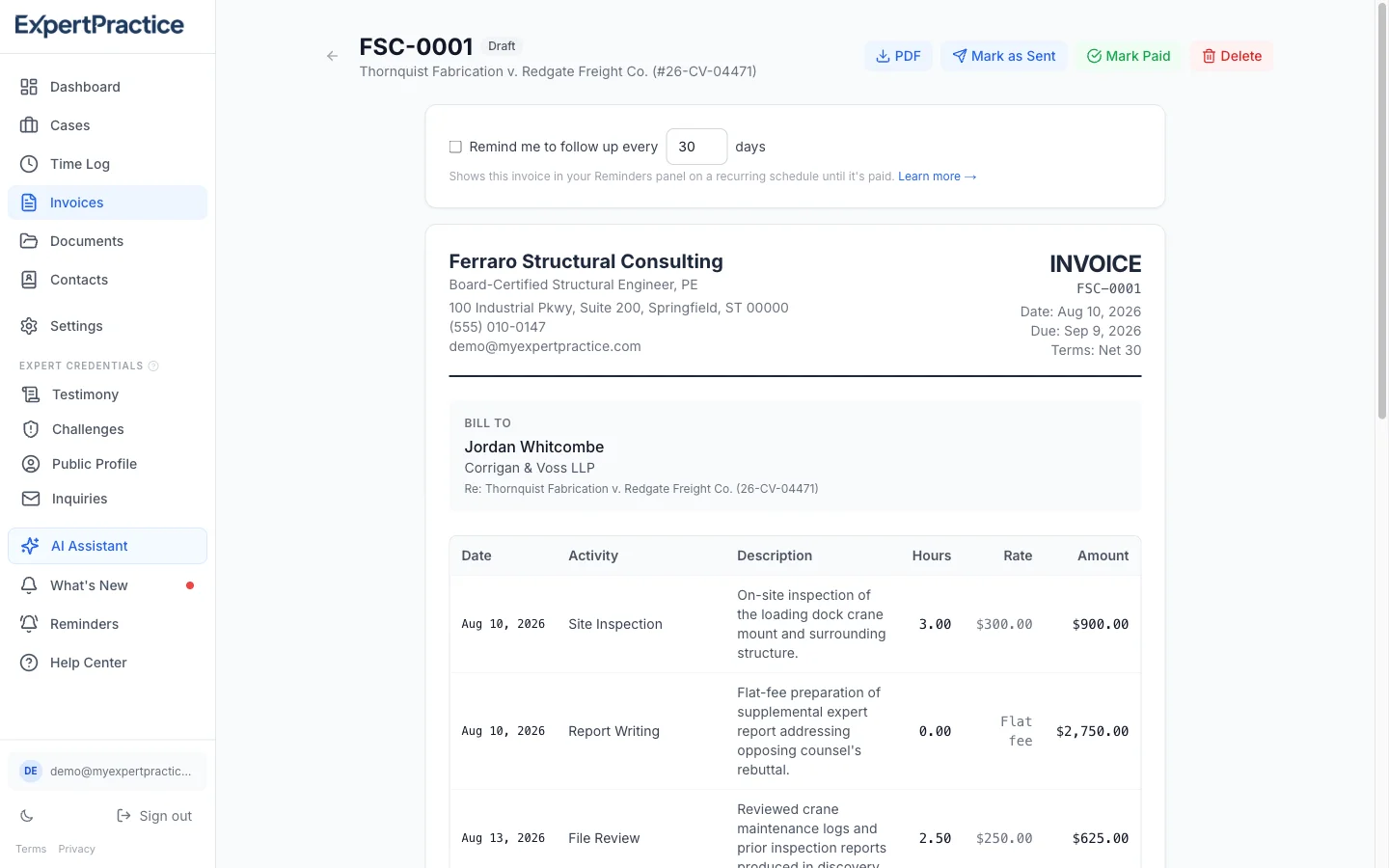
Audit-trail invoicing
Every invoice carries timestamped entries, activity descriptions, and a penny-verified rate breakdown — built to survive opposing counsel scrutiny.
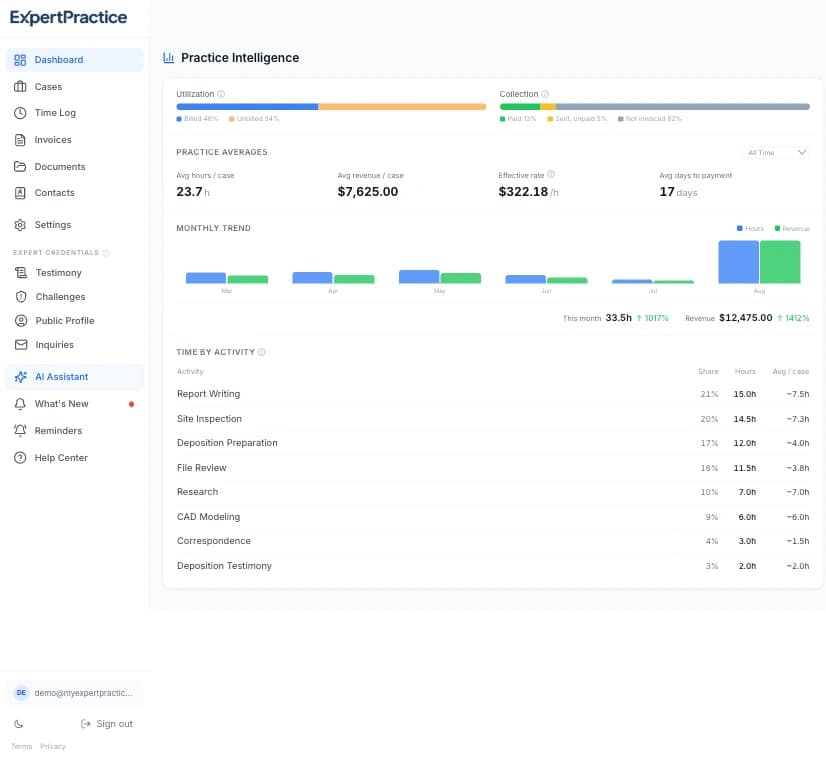
Practice intelligence
See where your revenue actually stands — billed vs. unbilled hours, collection status, and month-over-month trends, without exporting to a spreadsheet.
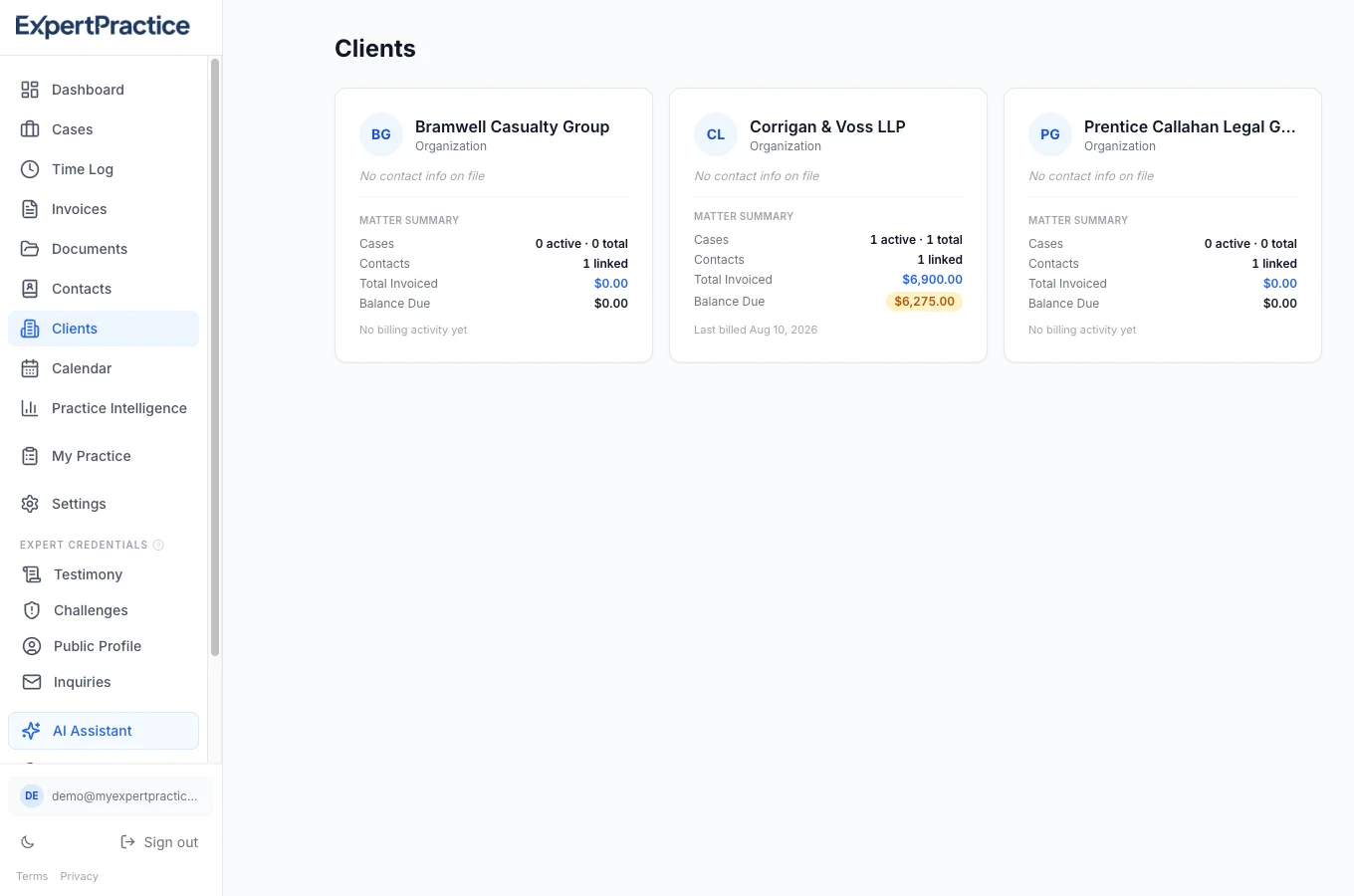
One profile per client
A firm or individual paying across multiple cases gets one record — every case, contact, invoice, and balance due, in one place, instead of scattered across every matter that mentions them.
Everything you need to run your expert witness practice.
ExpertPractice connects your cases, clients, calendar, documents, work, disclosures, billing, and payments so information doesn't live in separate tools.
Manage Your Practice
Case Management
Every case in one place — attorney contact, court details, case number, engagement type, and per-case rate structures. No more digging through email threads.
Client Profiles
One record per firm or individual paying across multiple cases — every case, contact, invoice, and balance due in one place instead of scattered across every matter.
Attorney Contact Book
Save attorney details once — name, firm, email, phone. Auto-fill them on any new case. Works for both retaining and opposing counsel.
Case Calendar
See every deposition, court date, and case-linked meeting in one place — recurring events and invoice due dates appear on the grid automatically.
Document Storage
Upload and organize documents per case. Keep engagement letters, reports, and correspondence alongside your billing data.
Track Your Work
Multi-Rate Time Tracking
12 built-in activity types, plus unlimited custom types, all with per-case rates. The rate auto-fills from your case setup.
Expense Tracking
Track travel, copying, postage, and other case expenses. Include them on invoices automatically.
Custom Activity Types
Add your own activity types on top of the 12 built-ins — right from the time entry form. Your most-used types float to the top automatically.
Recurring & Multi-Day Entries
Log one entry and apply it to several dates at once — pick specific days or set a recurring pattern like weekdays only or every N days.
Smarter Default Rates
Set a rate to $0 to hide an activity type you don't bill for. Case-specific rate overrides apply consistently everywhere you log time.
Smart Data Import
Upload your existing spreadsheet — we map your columns and migrate your data automatically. Or download a cleaned-up version to verify first.
Stay Prepared
Built-in Product Guide
Built-in guide that helps you navigate the app and get the most from every feature. Always available, never auto-navigates — you stay in control.
Practice Dashboard
See your active cases, hours logged this month, and outstanding invoices at a glance. Rule 26 and Daubert tracking are always one click away, too.
Your Data, Always
Export everything anytime — including a one-click tax year summary for your accountant with a redacted version that omits attorney names. No lock-in.
Get Paid
Audit-Trail Invoices
Generate PDF invoices with timestamped entries, activity descriptions, and rate breakdowns. Every calculation is verified to the penny.
Retainer & Flat-Fee Billing
Bill monthly retainers or fixed project fees alongside hourly entries — or on their own. Finally works for experts on retainer arrangements.
AR Aging Report
See every outstanding invoice bucketed by how overdue it is. Know at a glance who owes what and for how long.
1099 Payer Tracking
Automatically flags any client who's paid you $600 or more this year — the 1099-NEC threshold — and tracks whether you've received the form from them.
Practice Intelligence
Billed vs. unbilled hours, collection status, and month-over-month revenue trends — see where your practice actually stands.
FRCP compliance and challenge tracking
Expert witnesses face unique legal obligations. ExpertPractice now handles two of the most consequential — automatically.
Rule 26 Testimony Disclosure
FRCP 26(a)(2)(B) requires a list of all cases where you testified in the preceding four years. ExpertPractice auto-populates this from your time logs and exports a court-ready PDF in one click.
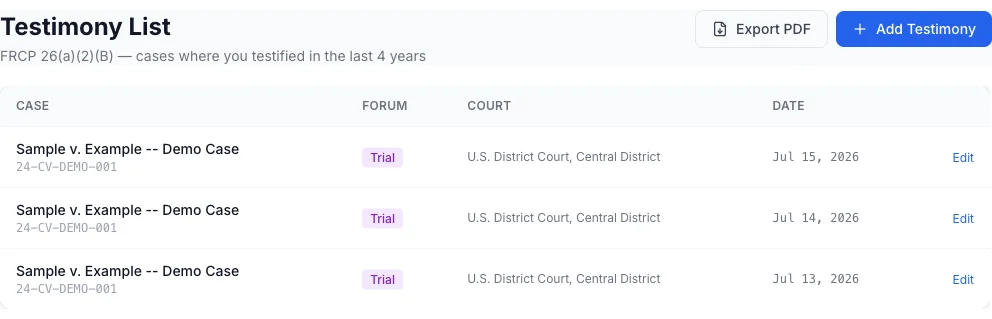
Daubert & Challenge Tracking
Track every Daubert, Frye, and motion in limine challenge to your testimony. Your admissibility record — favorable rate, outcomes, and case history — is one click away when attorneys ask about your credibility.
Your practice, from engagement to payment
Billing is the last step, not the point of the product.
Bring in the case
Set up the client, attorneys, court information, rates, and key dates. Takes 2 minutes.
Manage the work
Track deadlines on the calendar, log time and expenses, and keep documents organized as the case moves.
Stay prepared
Testimony history, Daubert challenges, and case activity stay current automatically — ready whenever attorneys ask.
Bill and collect
Turn the work already tracked into an accurate invoice, and monitor outstanding balances until they're paid.
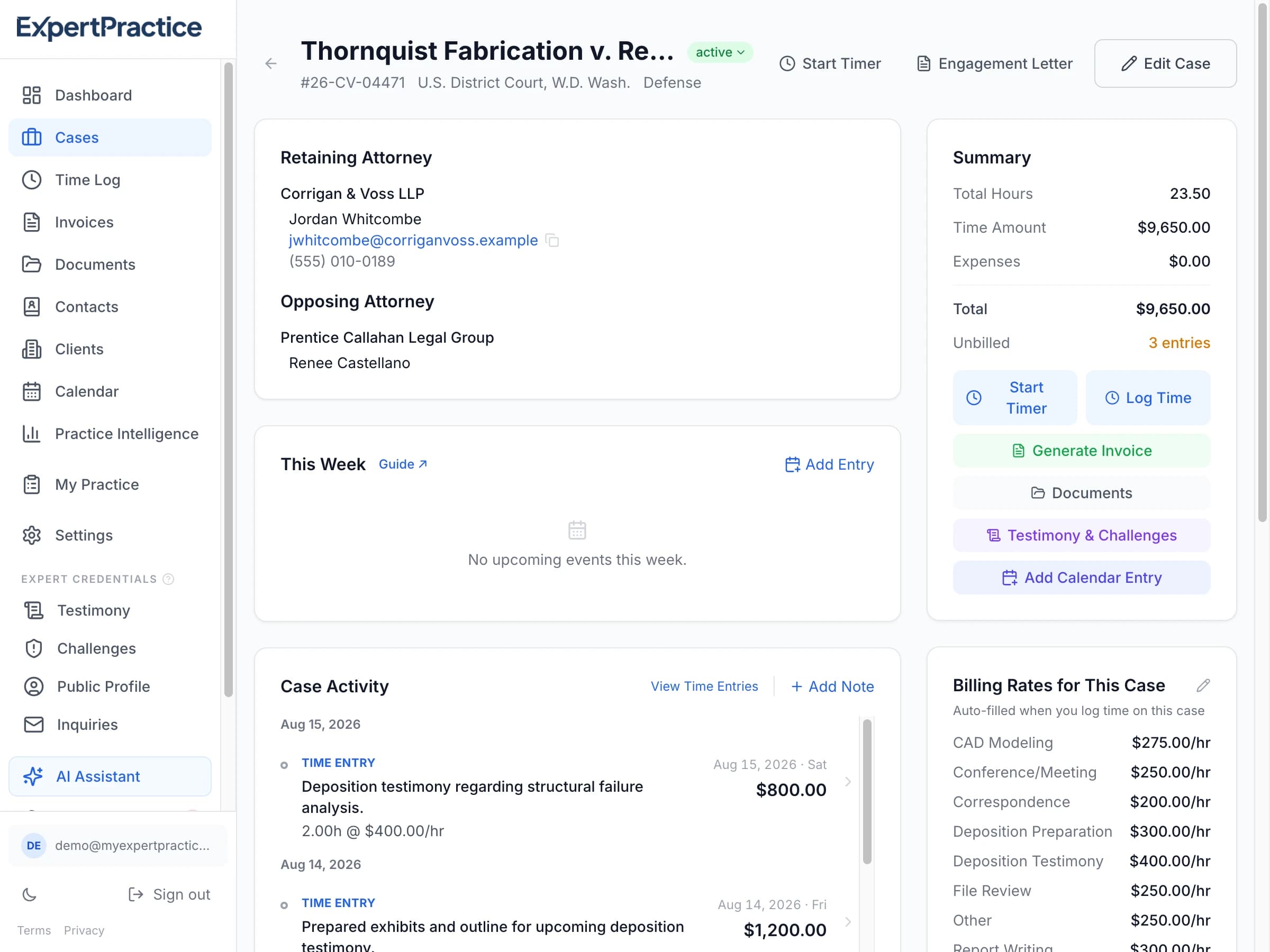
Everything about a case. In one place.
Open a case and see the attorneys, client, court details, upcoming dates, documents, activity history, time, expenses, invoices, payments, rates, and notes — without hunting through different tools.
“ExpertPractice has significantly reduced the time I spend on billing and invoicing while making my invoices look much more professional.”
Simple pricing
Less than 6 minutes of your billable time per month.
Most experts save 2–3 hours a month on invoicing alone.
ExpertPractice costs less than a single billable hour.
Solo Plan
Monthly
Annual
$468/yr
Manage your practice
- Unlimited cases
- Attorney contact book
- Client profiles across cases
- Document storage per case
- Calendar with case-linked events
- Tasks & to-dos linked to cases, with due dates on your calendar
- CSV case import
Track your work
- Multi-rate time tracking with custom activity types
- Expense tracking
Stay prepared
- Rule 26 testimony disclosure (one-click PDF)
- Daubert & challenge tracking
- Engagement letter generation
Get paid
- Audit-trail invoice PDFs
- Retainer & flat-fee billing
- AR aging report
- 1099 payer tracking ($600 threshold)
- Tax year export (for accountants)
Get found
- Public expert profile & directory listing
- Live availability status & profile view analytics
- Built-in Product Guide
- 14-day free trial
No credit card required
Frequently asked questions
Is my case data secure and confidential?
Yes. All data is encrypted in transit (TLS) and at rest in a SOC 2-compliant database. We never sell your data or share it for marketing. You can delete everything anytime from Settings.
Can opposing counsel discover my ExpertPractice data under Rule 26?
ExpertPractice doesn't change what is or isn't discoverable — that depends on the type of material and your jurisdiction's rules, not which software holds it. Time entries and invoices are generally treated differently than expert reports, correspondence, or case notes, which can bear on your opinions and are often discoverable regardless of where you store them. Talk to your retaining attorney about what to store and how.
I already use Toggl and Excel. Why switch?
Toggl doesn't understand multi-rate billing by activity type. Excel invoices have no audit trail. ExpertPractice connects your cases, time entries, expenses, and invoices so every dollar is defensible. Most experts save 2-3 hours per month on invoicing alone.
What if I only have a few active cases?
ExpertPractice is valuable even with 2-3 cases. You still save 2-3 hours a month on invoicing, and every invoice comes with a built-in audit trail if a fee ever gets questioned. At $49/mo — less than 6 minutes of your billable time — it pays for itself fast.
Is there a free trial?
Yes — 14 days with full access to all features. No credit card required to start. If it's not for you, just don't subscribe.
Can I import my existing cases?
Yes. Upload a CSV or Excel file and our importer will map your columns automatically. You can also download a cleaned-up version to verify before importing.
What does the product guide do?
The built-in Product Guide helps you navigate ExpertPractice and get the most from every feature. It's always available via the sparkle button — ask it how to create a case, generate an invoice, or import your data.
Run your expert witness practice in one place
Cases, clients, calendar, documents, time, billing, and disclosures — built specifically for expert witnesses. Start your 14-day free trial today. No credit card required.