Understanding 1099 Tracking
Which clients paid me $600 or more this year, and have I gotten a 1099-NEC from them yet?
Where to Find It
Click 1099 Tracking at the top of Invoices, next to Aging Report.
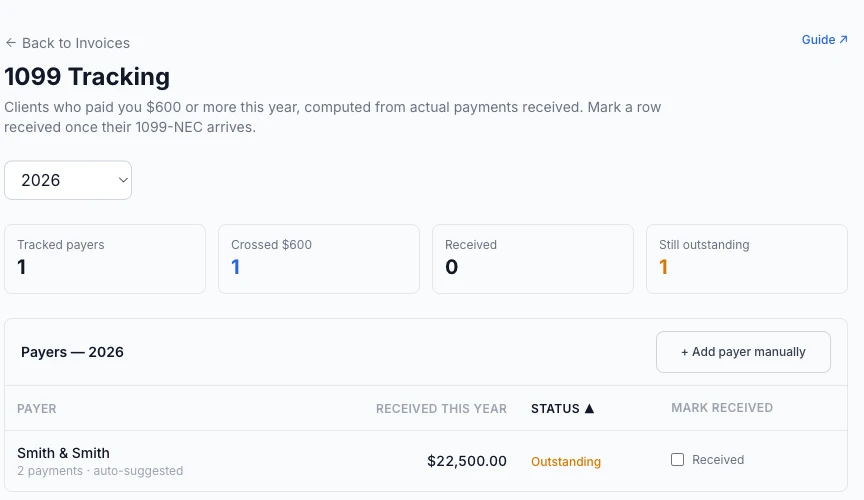
Who Owes You a 1099 (Not the Other Way Around)
As an independent expert witness, you're the one who receives a 1099-NEC — the client or firm that paid you $600 or more in a calendar year is the one with the IRS filing obligation, not you. This report is a checklist for tracking who owes you that form, so you can reconcile it against your own reported income at tax time. It doesn't generate or send any 1099 on your behalf.
How the $600 Threshold Works
The report totals actual payments received (cash basis — same convention as the Tax Year Summary export), grouped by payer, for whichever tax year you have selected. Any payer whose total crosses $600 for that year shows up automatically, tagged auto-suggested. This is computed live every time you load the page — it never shows a stale or cached number.
Firm vs. Individual Contact
A 1099 is issued per firm, not per individual attorney — so if a payer has a firm on file, that's what the report tracks and totals against, even if multiple people at that firm paid you across different cases. A solo contact with no firm on file (or a payment recorded under a free-text payer name with no linked contact) is tracked individually instead.
Adding a Payer Manually
The report only auto-suggests a payer once they've crossed $600 for the year. If you want to keep an eye on someone who hasn't crossed that threshold yet — say they've paid $500 so far and you expect more work with them this year — click + Add payer manually and pick them from your Contacts. This adds a row you can track and check off; it doesn't create or record any payment, and the amount shown is always their real total so far, computed the same way as every other row.
Marking a 1099 Received
Check the Received box on any row once that client's 1099-NEC actually arrives. This is saved immediately and persists across tax years — it's a manual checklist item, not something the report infers on its own.
Needs Review
Not every payment can be safely attributed to a payer automatically. If a payment landed on a case with more than one contact (co-counsel, an insurer and an attorney, etc.) and isn't linked to a specific invoice or payer, the report can't confidently say who it came from — rather than guess, or silently leave it out of every total, it's listed separately under Needs Review so you always know exactly how much money isn't yet accounted for.
Related guides