How Invoice Follow-Up Reminders Work
Does ExpertPractice email my client automatically if they don't pay, or is this just for me?
It Nudges You, Not Your Client
This feature never sends anything to the person who owes you money. It's an opt-in reminder that puts an unpaid invoice back in front of you on a schedule you set, so chasing payment doesn't depend on remembering to check.
Turning It On
Open the invoice and check Remind me to follow up every ___ days, then set the interval (30 is the default). On a split invoice, each payer has their own independent toggle and interval.

The countdown starts from whenever you turn the toggle on (or last dismissed a reminder) — not from the invoice's send date or due date. Changing the interval while it's on always restarts the countdown from that moment.
Where Reminders Show Up
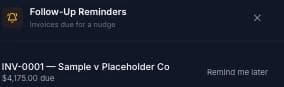
Click the bell icon in the sidebar (Reminders) any time an invoice's countdown has elapsed. The panel lists every due invoice with the amount still owed and a direct link to it, plus a Remind me later action that pushes the countdown out by the same interval again without turning the reminder off.
It Stops on Its Own Once Paid
There's no cap on how many times a reminder recurs — it repeats until you turn it off, or until the invoice's status changes to Paid, at which point it simply stops matching and disappears from the panel automatically. You don't need to remember to switch it off yourself once you've been paid.