Logging a Case Expense
I paid for something out of pocket for this case — mileage, a filing fee — how do I add that to what I bill?
Add It From the Case Page
Open the case and find the Expenses card — there's no separate expenses page. Click + Add to open an inline form right there.
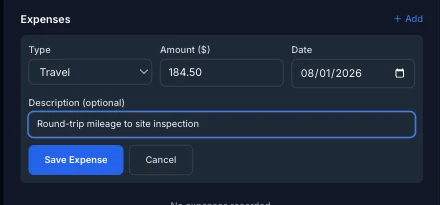
Type defaults to Travel and includes the built-in categories (Travel, Copying, Postage, Courier, Filing, Other) plus any custom expense types you've added in My Practice — see Custom Activity & Expense Types if you're not sure when a new type is warranted. Amount and Date are required (date defaults to today); Description is optional but the only place for case-specific detail, since Type is a reusable category, not a label. There's no receipt upload — expenses here are numbers and a note, not attachments.
Unbilled Until It's on an Invoice
A saved expense shows a status tag next to its amount: Unbilled until you pull it onto an invoice, then Invoiced once it's attached to one. The running Unbilled expenses total at the bottom of the card tells you at a glance what's waiting to be billed.
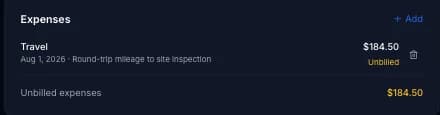
Expenses get pulled in automatically alongside unbilled time entries the next time you generate an invoice for the case — see Generating Your First Invoice. Once an expense is invoiced, its trash icon disappears: you can no longer delete it directly. To remove or correct an already-invoiced expense, void the invoice it's attached to first — voiding returns its expenses (and time entries) to Unbilled so you can fix them and re-invoice.
Related guides