Managing Your Contacts
Where do I keep attorney and contact info that isn't tied to just one case?
What Contacts Is For
Contacts, in the sidebar, is your firm-wide address book — every attorney, adjuster, or other party you deal with across every case, in one list. It's separate from adding retaining attorneys to a specific case, which is about who's on one engagement. Contacts is about everyone you've ever worked with, whether or not they're tied to a case right now.
It's the Same List Your Cases Use
You don't have to add someone here first before using them on a case. Add an attorney directly on a case form and ExpertPractice saves (or matches) them as a Contact automatically — no duplicate entry required. The reverse works too: once someone's in Contacts, picking them on a future case's attorney field autocompletes their firm, email, and phone instead of you retyping it.
Adding a Contact Directly
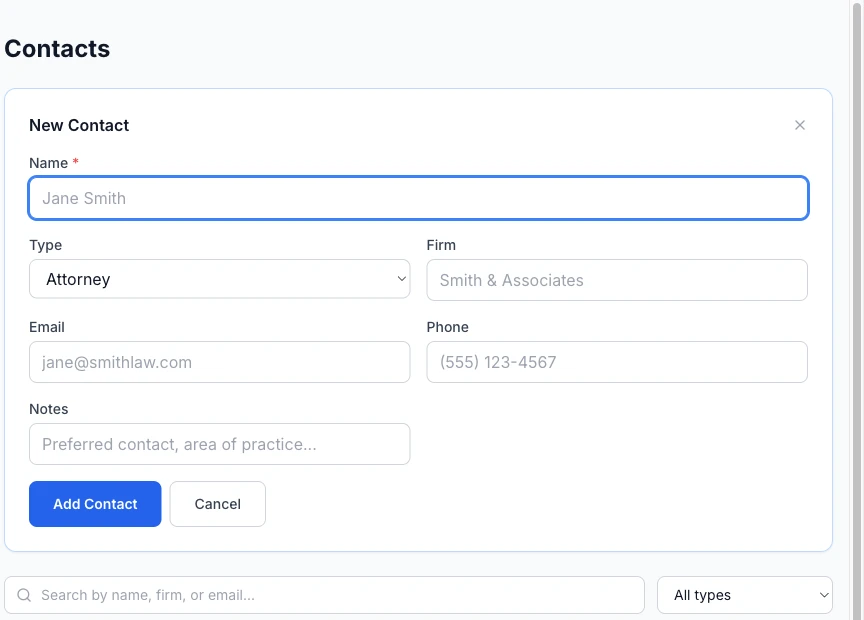
Click Add Contact to open a form for Name, Type, Firm, Email, Phone, and Notes. Useful for saving someone you know you'll work with before you've created a case for them yet.
Editing, Deleting, and Finding One Later
Each row has an edit (pencil) and delete (trash) icon. Deleting asks you to confirm first — it can't be undone. To find someone in a long list, the search box matches by name, firm, or email, and a type filter narrows it further. There's no separate detail page per contact — everything lives right in this list.