Adding Multiple Attorneys to a Case
Two attorneys from the same firm are retaining me on this case — how do I add both?
Adding a Second (or Third) Attorney
On the case form, the Retaining Attorneys section holds a list, not a single name. Click + Add another attorney below the last one to add a new row — each with its own name, type, firm, email, and phone. There's no limit worth worrying about (up to 10 per case), and removing one is a click on the × next to its name.
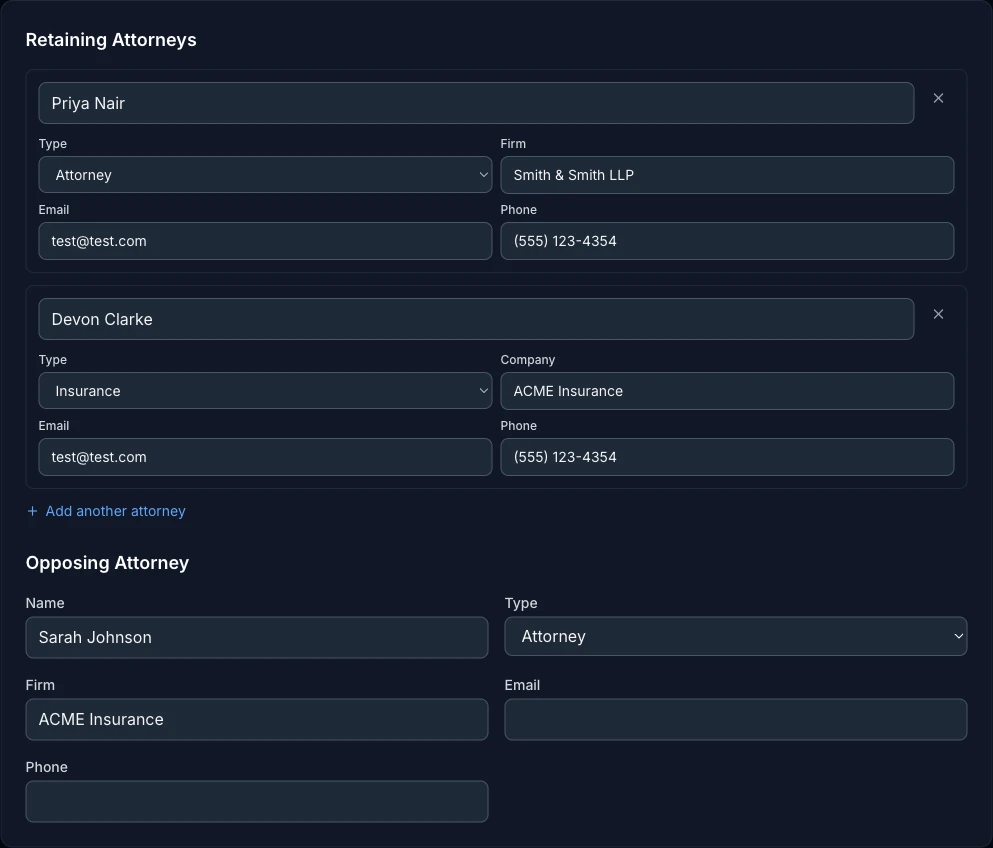
Each row's Type dropdown isn't locked to "Attorney" — the same list can hold an insurance adjuster, a party, or anyone else relevant to the case, each with the label and fields that make sense for their type. It's one contact list, not a strict roster of lawyers.
Same Firm or Different Firms — ExpertPractice Handles Both
You don't need to do anything special either way. If two attorneys share a firm name, everywhere that firm shows up (case detail, invoices, engagement letters, testimony disclosures), they're grouped under it together. If they're at different firms, each one gets attributed to their own firm correctly — nobody gets silently credited to the wrong firm because they happened to be second on the list.

Where This Shows Up
Every surface that used to show one attorney now shows all of them, grouped correctly:
- Invoices — the Bill To box lists each firm group on its own line.
- Engagement letters — the "To:" address block and salutation include everyone.
- Rule 26 testimony disclosures — the Attorney/Firm column captures every retaining attorney at the time testimony was logged, not just the first.
- Your data export — the full CSV export lists every attorney's name, email, and phone, not just one.
Opposing Attorney Stays Single
Opposing Attorney, just below the retaining list, is intentionally a single entry, not a list — it's asking who's on the other side, which is rarely more than one person or firm for how this field is used. If opposing counsel changes mid-case, just edit that one entry.