What Happens When You Mark an Invoice as Sent
I clicked Mark as Sent — what did that actually lock, and can I still fix things?
A draft invoice is safe to change freely — add or remove entries, adjust the payment terms, regenerate the PDF as many times as you like. Mark as Sent is the point where that changes.
One thing it doesn't do: email anything to your client. Mark as Sent is a status flag for your own records, not a delivery mechanism — download the PDF and send it however you normally do first, then come back and mark it here.
What Gets Locked
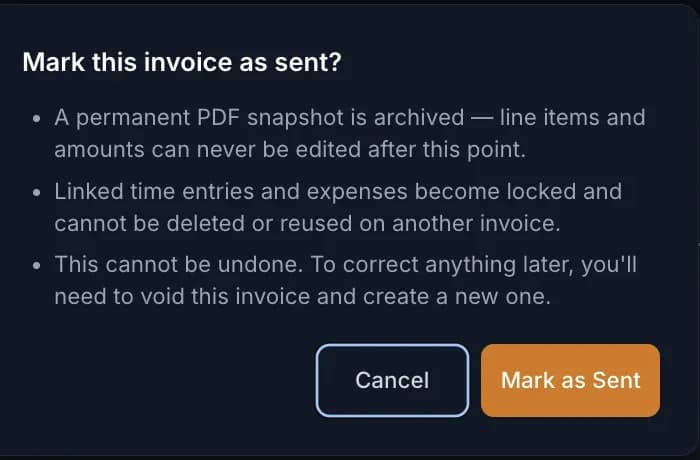
Once an invoice is marked as sent, its line items and amounts can never be edited again. Every time entry and expense linked to it locks too — they can't be deleted or reused on a different invoice. This is deliberate: it's what makes the invoice a reliable, audit-ready record instead of a number that could quietly change after the fact.
The Permanent PDF Snapshot
At the moment you mark an invoice sent, ExpertPractice archives a permanent PDF exactly as it looked at that moment. That snapshot is your proof of what the client actually received first — even if a payer's balance changes later as payments come in, the original PDF never does.
What You Can Still Do
After an invoice is sent, you can still:
- Record payments against it — partial or in full
- Send payment reminders
- Re-download the PDF from the invoice detail page any time — since nothing about a sent invoice can change, it will always match what the client originally received
- View the full payment history
That archived snapshot becomes especially useful later: if the invoice is ever voided, it's the one thing that still shows you exactly what was originally sent.

What You Can't — and What to Do Instead
You cannot edit the amount, line items, or payment terms on a sent invoice. If you catch a mistake — wrong rate, missing entry, wrong case — after sending, the fix is to void the invoice. Voiding releases the linked time entries and expenses back to unbilled so you can correct them and generate a new invoice with the right numbers.