Renaming a Document
Can I change a document's name without uploading it again?
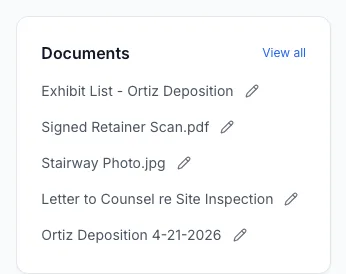
Yes. Every document you've uploaded has a small pencil icon next to its name. Click it, type the new name, and you're done. You don't need to download the file, rename it on your computer, and upload it again.
Renaming From the Documents Page
- Open Documents from the sidebar.
- Click the pencil icon next to the document's name. The name turns into a text box.
- Type the new name, then press Enter or click anywhere outside the box to save. Press Esc to cancel and keep the old name.

Renaming From a Case
The Documents card on a case's page has the same pencil icon next to each name, and it works the same way. The card shows the case's five most recent documents. Click View all to see the rest of that case's files on the Documents page, where you can rename any of them.
What Changes and What Doesn't
The new name is used everywhere ExpertPractice (EP) shows the document:
- the Documents page and the case's Documents card,
- the document's entry in the case's Activity feed,
- the title at the top of the viewer when you open a PDF,
- the file name you get when you download it.
Renaming does not change:
- the file itself. We keep the original file exactly as you uploaded it, and only the name shown in EP changes.
- which case the document belongs to, or its document type.
- any highlights or notes you've saved on a PDF. They stay with the document.
Downloads Keep the Right File Extension
You don't have to type .pdf, .docx or any other extension. If the new name doesn't end with one, we add the right extension when you download the file, so it still opens in the right program. For example, a Word file renamed to Letter to Counsel re Site Inspection downloads as Letter to Counsel re Site Inspection.docx.
Rules for Names
- A name can't be empty and can be up to 200 characters long.
- Slashes become dashes, so Deposition 4/21/2026 is saved as Deposition 4-21-2026.
- We remove unusual invisible characters (sometimes pasted in along with copied text) and extra spaces.
If a name doesn't fit these rules, a message appears under the box and nothing is saved until you fix it.
Which Files Can Be Renamed
All of them: PDF, DOC, DOCX, JPG and PNG. Only PDFs can be opened inside EP, but every file type can be renamed and downloaded.